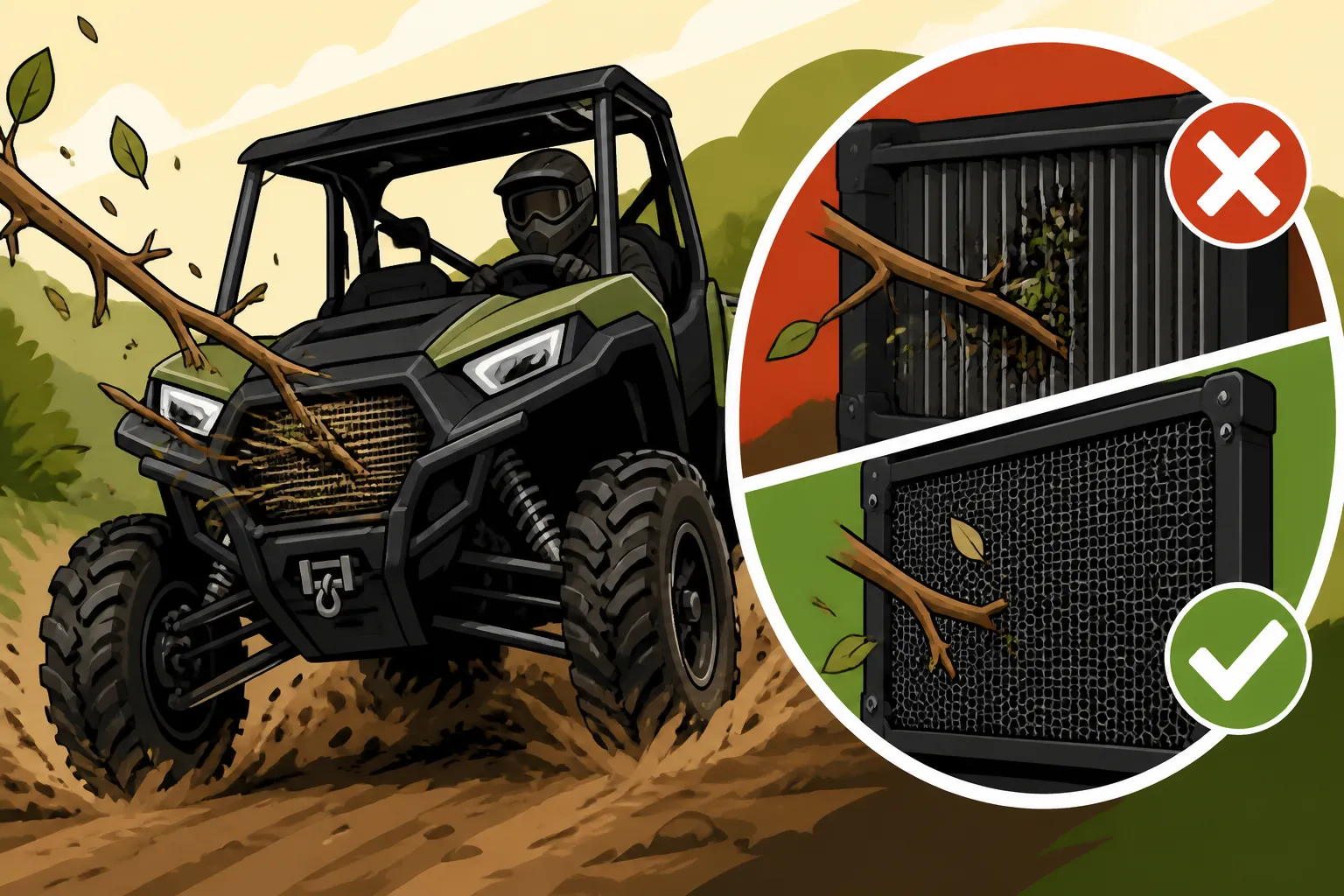
Why Bush Debris Calls for a Radiator Screen
A radiator can look clean before a ride and be nearly sealed with grass, leaves, seed fluff, and mud by the time you leave the bush. That buildup blocks airflow, making an ATV or UTV work harder to stay cool. A properly fitted radiator screen helps catch the debris before it packs into the fins, but it still needs regular checks and cleaning.
Why bush debris can overheat an ATV or UTV
A radiator needs steady airflow
Your machine’s radiator releases heat from the engine coolant into the air moving through its fins. The cooling fan helps draw air through when riding speed alone does not provide enough airflow, such as when crawling through a tight trail or stopping on a warm day.
Bush debris interferes with that process by collecting across the radiator’s face. Fine grass, poplar fluff, seeds, and small leaves can form a mat. Damp vegetation and mud can make that mat denser, reducing the air that reaches the cooling surface. The machine may then run hotter, especially when it is moving slowly and the engine is working hard.
This can happen even when the radiator does not look dramatically clogged from the outside. A thin layer of fluff or plant matter may cover enough of the fins to restrict airflow. And because radiators often sit behind a grille or in a recessed area, the blocked section can be difficult to see without looking closely.
Saskatchewan bush conditions can load a radiator quickly
A ride through open grassland presents different challenges from a narrow, brushy trail. In wooded and bushy areas, your machine may push through low vegetation, cross grassy edges, or follow a route where loose plant matter blows directly toward the radiator. Wet ground can also send mud and fine debris toward cooling components.
Conditions vary from one riding area to another. A loop through the trees near Narrow Hills may expose a machine to different debris than an open stretch of trail near a community riding area. That is one reason a screen is useful even if the radiator was clear at the start of the day. It can catch material gradually, before you notice a temperature warning or see a change in engine performance.
For route planning, riders sometimes use a tool such as onX Offroad to organize the day and keep track of where they intend to ride. A map does not tell you how much debris will reach the radiator, so treat the machine itself as the best source of information: check it after brushy sections and whenever conditions change. For general trip preparation, Saskatchewan Trail Conditions Before You Haul is a useful related read.
What overheating may look or feel like
An overheating warning, a temperature gauge that climbs beyond its usual range, or an unexpected warning light should be taken seriously. You may also notice the cooling fan running more often than usual, reduced performance, or steam. These signs do not prove that debris is the cause, but a blocked radiator is one possibility worth checking once the machine is safely stopped and has cooled.
Do not keep riding simply because the warning disappears when you pick up speed. Faster travel can increase airflow temporarily, but it does not remove a layer of packed grass or mud. Continuing to ride with restricted cooling can add stress to the engine and turn a manageable trail-side cleanup into a more serious mechanical problem.
If the temperature rises, move to a safe place off the trail, switch off the machine, and follow the operator’s manual for cooling and inspection. Never remove a radiator cap while the system is hot; pressurized coolant can cause severe burns. If the machine continues to overheat after debris is cleared and the radiator has cooled, stop troubleshooting on the trail and arrange appropriate mechanical help.
What a radiator screen does and does not do
The screen catches debris before it reaches the fins
A radiator screen sits in front of the radiator and intercepts larger material before it can lodge in the delicate cooling fins. Depending on its design, it may catch leaves, twigs, grass, seed heads, insects, and some of the loose vegetation kicked up during a ride.
That barrier makes cleanup easier. Rather than picking plant matter from between radiator fins, you can often remove or open the screen and clear the debris from its surface. This matters because radiator fins are thin and easy to bend. A screen can reduce the amount of direct handling and scraping the radiator needs.
The screen is not a sealed shield, and it cannot stop every particle. Fine dust, small seeds, and muddy water may still pass through, especially if the material is wet or the screen openings are relatively wide. Think of it as a first line of defence—not a reason to skip inspections.
A screen must still let air pass through
A screen that catches debris but restricts too much airflow can create a problem of its own. Very fine mesh may clog quickly with grass or fluff, particularly in damp conditions. Once covered, even a well-designed screen can act like a blanket over the radiator.
The goal is a screen that suits your machine and riding conditions, sits securely in place, and allows adequate airflow. Follow the manufacturer’s fitment and maintenance instructions, and do not improvise a cover that blocks the radiator or fan. A universal-looking piece of mesh may not account for the shape of your grille, nearby wiring, access panels, or the movement of components.
| Screen or setup choice | Potential benefit | What to watch for |
|---|---|---|
| Screen designed for your machine | Better fit and easier installation | Confirm that it does not interfere with the fan or other components |
| Coarser openings | May allow airflow and be easier to clear | Smaller debris can still reach the radiator |
| Very fine mesh | Can catch smaller material | May clog quickly with fluff, grass, or wet debris |
| Removable or easily accessible screen | Makes trail-side cleaning more practical | Check that fasteners stay secure during rough riding |
| No screen | No added barrier in front of the radiator | Debris can collect directly on the radiator fins |
A screen is only helpful when you can inspect and clean it. If access requires removing several parts, you may be less likely to check it during a long day. Consider that practical detail before choosing a setup.
A screen does not replace radiator care
Even with a screen installed, inspect the radiator itself. Fine particles can pass through, and some machines may draw debris from angles the screen does not fully cover. Also check that the fan area is clear and that the screen has not shifted, loosened, or become pressed against a component.
Cleaning matters too. Use the approach recommended in the machine’s manual. In general, avoid directing a high-pressure spray straight at radiator fins, because the force can bend them and make airflow worse. If you rinse the screen, remove loose material carefully and let the parts dry as appropriate before putting the machine away.
A screen also cannot solve a cooling issue caused by low coolant, a damaged hose, a malfunctioning fan, or another mechanical fault. If the radiator is visibly clear but the machine still runs hot, look beyond the screen and get the problem assessed rather than assuming the next layer of mesh will fix it.
Choosing and maintaining a screen for bush riding
Start with fit, attachment, and access
Check whether your ATV or UTV manufacturer offers a screen made for your model. A close fit helps reduce gaps where debris can bypass the barrier and lowers the chance of a loose edge rubbing against nearby parts. If you are considering an aftermarket option, verify compatibility with the exact machine and follow the installation instructions.
Pay attention to how the screen attaches. Fasteners should stay secure over ruts and vibration, yet allow you to remove or open the screen for cleaning. Make sure the installation does not interfere with the cooling fan, wiring, radiator hoses, grille, or service access. If a screen requires cutting, drilling, or altering the machine, confirm that the change is appropriate before proceeding.
It is worth checking installation before a long trip rather than discovering a loose screen at a trailhead. A short test ride gives you a chance to listen for rattling and confirm that the screen remains in position. If anything shifts or makes contact, stop and correct it before heading into a remote area.
Match the screen to the riding you actually do
A rider who mainly travels on open, dry trails may encounter less leafy material than someone weaving through dense brush or riding through grass. If your typical outings include narrow bush trails, tall grass, or soft ground, you may need to inspect the screen more often and carry a small brush or suitable cleaning tool.
Local route knowledge helps with preparation, but it cannot predict every condition. Use trail reports and club information to understand the general route, then build in time for checks. If you are using onX Offroad to plan a route, include practical stopping points in your day rather than assuming you can ride continuously without looking over the machine. The app is a planning aid; your screen still needs a physical inspection.
For riders exploring areas with substantial brush, Saskatchewan Trails With Bush Riding can help frame the kind of conditions to prepare for. Before a longer trip, it is also sensible to review Saskatchewan ATV Trail Map Downloads and Saskatchewan Trail Etiquette Locals Expect, especially if the route crosses shared-use areas or unfamiliar trail networks.
Make cleaning part of your ride routine
A quick check at a natural break is often easier than waiting until a warning appears. Stop after a particularly grassy or brushy stretch, park safely, and inspect the screen for an even layer of debris or a concentrated patch near the centre. If the screen is beginning to look covered, clear it before continuing.
Carry gloves if you expect to handle wet vegetation, and avoid reaching near a fan or other moving parts. Turn the machine off before inspection, allow hot components to cool, and follow the operator’s manual. If you need tools to remove the screen, keep the appropriate tool with your ride kit and make sure fasteners are not lost in the grass.
At the end of the ride, clean the screen and take a look at the radiator behind it. Removing debris before storage prevents a layer of plant matter from sitting against the machine and gives you a chance to notice damage early. Riders who travel north or across soft ground can also review Which Tires Handle Muskeg North of Prince Albert and Saskatchewan Riding After Heavy Rain when planning for conditions that may increase mud and debris buildup.
A practical radiator-screen routine for a day on the trail
Before leaving home
Start with a cold machine. Check that the screen is firmly attached, the radiator area is clear, and the fan opening is unobstructed. Look for bent fins, loose fasteners, damaged mesh, or debris left from the previous ride. If you find damage, address it before heading out rather than hoping it will hold together through a rough trail.
Bring the cleaning supplies you are likely to need and know how to access the screen. If you are riding with others, agree on a safe place to stop and check machines. A group can otherwise stretch out along a trail while one rider is dealing with a temperature warning.
Think about the route and the day’s conditions. A map or route-planning tool such as onX Offroad can help you organize where you intend to go, but leave room for breaks and checks, especially if the route includes brushy stretches. For more general preparation around remote routes, Saskatchewan Trail Etiquette Locals Expect offers useful context for sharing trails responsibly.
During the ride
Make a brief inspection after sections where the machine has pushed through vegetation, and again if the fan seems to be running more than usual or the temperature begins to climb. Park away from other riders and traffic, shut the machine off, and give hot parts time to cool. Clear debris gently from the screen instead of scraping at the radiator fins.
If the screen is packed with wet grass or mud, do not assume that brushing off only the visible centre is enough. Check the corners and edges, where material can collect and stay hidden. Once cleared, confirm that the screen is seated correctly before moving on.
If the temperature warning remains or returns, stop riding and consult the manual. Repeatedly restarting or revving an overheating machine can make the situation worse. A clean screen is a useful first check, not proof that the cooling system is healthy.
After the ride
Clean the screen before the machine goes into storage, then inspect the radiator through the openings. Look for bent fins, trapped seeds, mud, damaged mesh, and anything that might restrict the fan. If you find a persistent cooling issue, or the radiator appears damaged, have it checked rather than relying on a screen to compensate.
Keep an eye on how often the screen loads up. If it becomes clogged after a short stretch of ordinary riding, reassess the mesh, fit, and cleaning routine. A screen should make maintenance more manageable, not become a hidden blockage that goes unnoticed.
The simplest habit is also the one most likely to prevent a frustrating ride-ending problem: check the screen before departure, after debris-heavy sections, and when the machine shows signs of running hot. That small pause can help protect airflow and keep a minor cleanup from turning into a trail-side mechanical headache.
Disclaimer
This article is for general informational purposes only and does not constitute professional advice. Laws, prices and regulations vary by location and change over time. Consult a qualified professional for guidance on your specific situation.